Trivia Spin-Guess Brain Quiz
SeverexTrivia
4.4461.00 Reviews
- Version
- 2.6.0
- Installs
- 1.00M
- Age Rating
- Everyone
Screenshots
Our Review of Trivia Spin-Guess Brain Quiz
 Analysis by Appyee
I often reach for a trivia game when I have a few spare minutes, but I don’t always want to commit to a long quiz or a complicated setup. Trivia Spin-Guess Brain Quiz is aimed at that quick-play mood: it mixes general knowledge with a spinning-wheel idea, so there’s a little uncertainty before you settle into answering. It is a casual game from Severex, and its appeal is less about deep study than making a short break feel more playful.
Where players can get stuck
The basic idea sounds straightforward, but trivia games can become frustrating when a question depends on a specific name, spelling, or detail you either know instantly or don’t. That is especially true when you are playing quickly: pausing to think may feel costly, while guessing can be a gamble. I would treat each round as a light challenge rather than a test of how intelligent or well-read I am.
The wheel is part of the game’s identity, but chance is a trade-off. It can make a session less predictable, yet it also means the experience may not feel entirely determined by what you know. If you prefer quizzes where every result is a direct measure of accuracy, a conventional question-and-answer game may suit you better. Here, I’d enjoy the surprise without reading too much into a single score.
It also helps to remember what this game is designed to do. The store summary points to guessing logos, songs, countries, and flags, alongside a millionaire-style trivia quiz. That variety suggests a mix of recognition and general-knowledge play, not one narrow subject to master. If you open it expecting a structured course or detailed explanations after every answer, you may want a different kind of learning app.
Getting Started with Trivia Spin
Getting into Trivia Spin-Guess Brain Quiz is as easy as pie. The app is available for both Android and iOS, so you can download it from the Play Store or the App Store, depending on what device you're rocking. Once it's on your phone, just fire it up and you're ready to dive into the world of trivia.
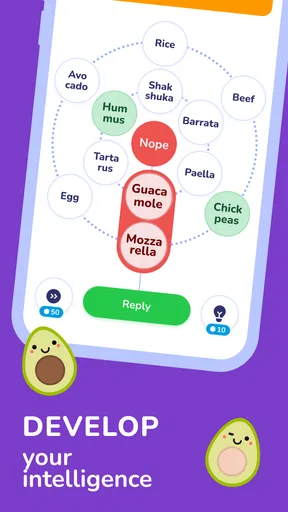
The interface is super intuitive. You’re greeted with a colorful and simple layout that makes navigation a breeze. The main screen gives you various categories to choose from, like history, science, pop culture, and more. Whether you’re a history buff or a movie aficionado, there’s something here for everyone.
Setup checks that save time
Before starting, I’d make two quick checks rather than assuming every hiccup is a game problem. First, confirm your phone can run the current release: version 2.6.0 requires Android 8.0 or later. Second, make sure you have a stable connection if a screen or online element seems slow to load. Those are sensible first steps for a mobile game, not a guarantee that every delay comes from your device or network.
The game is free to install, but it includes optional in-app purchases, with items ranging from $0.99 to $19.99. I’d decide in advance whether I’m comfortable with optional spending, especially if a child will be using the phone. The age rating is Everyone, but that does not remove the need for a parent or account holder to manage purchase settings. A quick check of the device’s purchase controls can prevent an accidental tap from turning a casual session into an unwanted expense.
For a first session, I’d keep the goal modest: open the game, try a few questions, and see whether the mix of categories and pace suits you. That is more useful than judging it after one answer or immediately spending money. Trivia tastes are personal; someone who loves visual recognition may enjoy a logo or flag prompt, while a player who wants a carefully explained lesson may find the format too brisk.
Dive into the Game
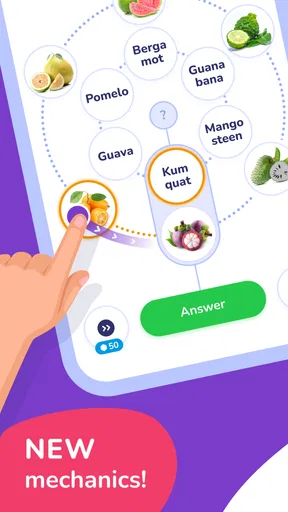
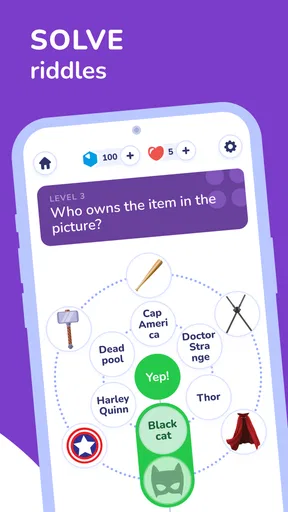
Once you pick a category, the fun begins. The app throws questions your way, and you need to select the correct answer from multiple choices. What I love about this is the timer that adds a bit of pressure to the mix, making each question feel like a mini race against time.
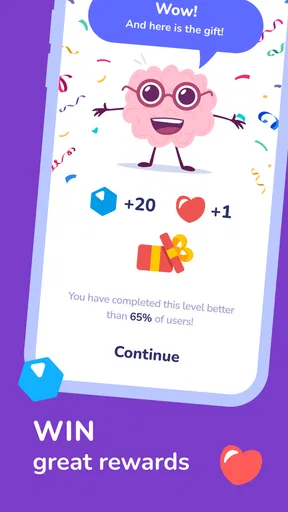
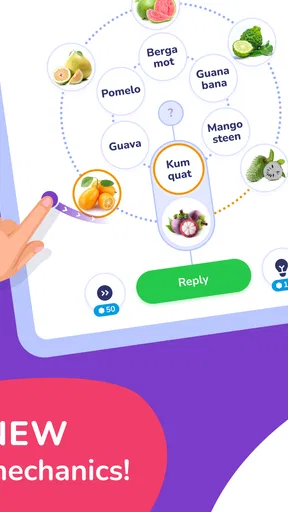
Oh, and did I mention the spin? Before you start guessing, you get to spin a wheel that can either boost your score or add a twist to the game. It’s a quirky little feature that adds an element of surprise and keeps things exciting.
Make short sessions work for you
This kind of game fits naturally into small gaps: waiting for a ride, sitting through a short break, or sharing a phone with a friend while deciding what to do next. I would not start a round when I need to watch the clock closely or when the phone is about to lose signal; a timed question is more enjoyable when I can give it attention instead of rushing through it distractedly.
A useful habit is to notice which prompts rely on recognition and which ask for broader recall. For example, a flag or logo can reward a quick visual association, while a country or general trivia question may call for facts you remember from elsewhere. Keeping those mental modes separate makes it easier to see whether a wrong answer came from unfamiliar knowledge or simply from not recognizing an image fast enough.
If I am playing with someone else, I would take turns answering aloud before tapping. That keeps the game social without needing to assume that a formal group mode is available, and it turns wrong answers into conversation rather than a reason to blame the app. It is also a simple way to make a short wait feel less like everyone staring at separate screens.
Challenge Yourself and Others
If you’re someone who thrives on competition, you’ll be thrilled to know that you can compete with other users worldwide. The leaderboard feature lets you see where you stand compared to trivia enthusiasts across the globe. It’s a fantastic way to test your knowledge and see how you stack up.
There’s also a neat feature where you can challenge your friends. It’s a perfect way to settle those "who knows more" debates. Plus, it brings a social element to the game, making it more engaging and fun.
How it compares with other trivia games
Compared with a plain quiz app that presents one question after another, the wheel gives this game a more playful, less predictable identity. That is a plus when I want variety and a quick burst of competition. A traditional quiz can be the better choice if I want a calm, uninterrupted sequence, while a specialist learning app is more suitable when I need explanations, progress tracking, or a planned path through a subject.
It is also different from trivia built mainly around a single topic. The mix described for this game—logos, songs, countries, and flags—can suit players who like switching between visual clues and general knowledge. The trade-off is that fans of one subject may prefer a focused quiz with a deeper question pool in that area. I’d choose based on whether I want breadth and a bit of chance, not on the assumption that one format is universally better.
There is a social comparison element through competition and the leaderboard, but I would treat rankings as motivation rather than a serious measure of knowledge. People may play at different times and with different strengths, and a quick trivia score only captures performance in that session. If competing makes you enjoy the questions, use it; if it makes casual play stressful, ignore the ranking and focus on the round in front of you.
Workflow recovery when a session goes wrong
If a question or screen appears to stall, I would avoid tapping repeatedly in a hurry. Give the game a moment, check whether the phone is still responsive, and then try returning to the game normally. If the problem continues, closing and reopening the app is a sensible basic recovery step. It may interrupt a session, so I would not do it mid-round unless the game is already unresponsive.
When an answer seems not to register, first check whether the tap landed on the intended choice and whether the timer is still active. A rushed touch can be mistaken for a game fault, particularly on a small screen. If the issue happens repeatedly, restarting the app and checking for a stable connection are reasonable next steps; I would avoid repeatedly reinstalling it before trying simpler checks.
For purchases, I would pause before trying again if a payment appears delayed. Check the device’s purchase history and account controls first, so you do not accidentally submit the same request more than once. Since the game has optional paid items, this small bit of patience is more useful than tapping a purchase button repeatedly while waiting for a response.
Learning with Fun
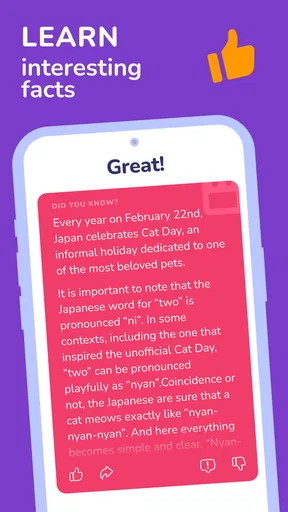
One of the things that set this app apart is how it makes learning so much fun. Each question is not just a test of your knowledge but also an opportunity to learn something new. I found myself Googling more about the topics after playing, which is a testament to how addictive and enlightening this app can be.
The developers did a fantastic job curating questions that are both challenging and informative. It’s like having a fun fact machine in your pocket, ready to dish out random trivia whenever you feel like it.
When the app may not be the cause
A slow or interrupted round can come from several ordinary sources: a weak connection, a phone that is busy with other tasks, or a momentary issue with the device. I would test the game again when the phone is responsive and the connection is steady before deciding that the quiz itself is at fault. If other apps are also struggling, that points toward a broader device or network issue rather than a problem unique to this game.
Likewise, a question that feels unfamiliar is not necessarily a fault. Trivia covers topics people know unevenly, and recognition prompts depend on having seen a particular logo, song, country, or flag before. I find it more helpful to use those misses as clues about what I do not recognize yet than to expect every question to match my interests.
There are limits to what a casual trivia round can teach. If I want to remember a fact reliably, I would look it up after playing and spend a little time checking the context rather than treating a correct guess as learning. That turns the game into a starting point for curiosity, not a replacement for a lesson or a reference source.
Who will enjoy it—and who should pass
I think it is best for people who like varied quiz prompts, short sessions, and a little uncertainty from the wheel. It can also work well as a low-effort activity with a friend: take turns, compare guesses, and use the questions to spark a conversation. With a 4.4 average from around 17,000 ratings and more than a million installs, it has attracted a substantial audience, though popularity alone does not guarantee that its pace or style will suit you.
I would steer away if you strongly dislike timed play, chance affecting a round, or optional purchases appearing in a free game. It is also not my first pick for a person seeking a quiet study tool with carefully sequenced lessons and explanations. The Everyone age rating makes it broadly accessible, but younger players may still need an adult to oversee device purchase settings.
Is It Worth Your Time?
Absolutely! If you’re someone who enjoys trivia games or even if you’re just looking for a way to kill time while learning a thing or two, Trivia Spin-Guess Brain Quiz is a fantastic choice. The app is free, though it offers in-app purchases if you want to get rid of ads or buy power-ups. But trust me, the free version is more than enough to keep you entertained.
The ads can be a bit pesky, but they’re a small price to pay for all the fun and knowledge you’re getting. Plus, it’s a great way to support the developers who’ve put so much effort into creating such a delightful experience.
So, if you’re up for a challenge or just looking to have some fun while learning, give Trivia Spin-Guess Brain Quiz a spin. You might just become the trivia master you’ve always aspired to be!
Verdict
Strengths of Trivia Spin-Guess Brain Quiz
- Wide variety of trivia categories.
- Engaging multiplayer mode.
- User-friendly interface.
- Regular updates with new questions.
- Challenging levels keep users hooked.
Limitations of Trivia Spin-Guess Brain Quiz
- Requires constant internet connection.
- Some ads can be intrusive.
- Limited customization options.
- Occasional app freezes reported.
- In-app purchases can be costly.
Other Releases by Severex
View All
Similar Picks in This Category
View All
Millionaire 2026 Quiz & Trivia
Quiz & Trivia Games by Submarine Apps4.5

Brain Test 2: Tricky Stories
Unico Studio4.7

Trivia Crack: Brain Quiz Games
etermax4.4

QuizzLand. Quiz & Trivia game
Quiz & Trivia Games by Mno Go Apps4.8

Brain Test: Tricky Puzzles
Unico Studio4.7

Logo Quiz
bubble quiz games4.5
Frequently Asked Questions
What is Trivia Spin-Guess Brain Quiz?
Trivia Spin-Guess Brain Quiz is an engaging trivia game designed to test your knowledge across various categories. It offers a unique spin-the-wheel mechanism to choose topics, ensuring each gaming session is fresh and exciting. The app provides a fun way to challenge yourself or compete with friends.
Is Trivia Spin-Guess Brain Quiz free to play?
Yes, Trivia Spin-Guess Brain Quiz is free to download and play. However, it includes optional in-app purchases for those who want to enhance their experience with additional features or remove ads. These purchases are not necessary to enjoy the game fully.
What platforms support Trivia Spin-Guess Brain Quiz?
Trivia Spin-Guess Brain Quiz is available on both Android and iOS platforms. You can download it from the Google Play Store for Android devices and the Apple App Store for iOS devices. Ensure your device meets the minimum requirements for smooth gameplay.
Does Trivia Spin-Guess Brain Quiz require an internet connection?
Trivia Spin-Guess Brain Quiz requires an internet connection for certain features such as leaderboards, multiplayer modes, and updates. However, some offline modes may be available for solo play, allowing you to enjoy trivia challenges without being connected to the internet.
Can I play Trivia Spin-Guess Brain Quiz with friends?
Yes, Trivia Spin-Guess Brain Quiz offers multiplayer modes where you can challenge friends or other players globally. You can invite friends directly or join random matches to compete for the highest scores, making it a great game for social interaction.
Play our best games!


